Author: Amo

  • Snapshots of my upcoming game

    Here are a few quick and screenshots, videos and tests from an upcoming game I am writing for the iPhone (iOS) platform using cocos2d;

    Images

    snapshot

    Video

    [tubepress video=’cQPimLxs_Bo’ description=’false’ author=’false’ length=’false’ tags=’false’ theme=’youtube’ uploaded=’false’ category=’false’ descriptionLimit=’0′ views=’false’]

  • cocos2d: Displaying a grid of items in a scrollview, clipping node

    In a cocos2d iOS game I am currently writing, one of the things I wanted was to display a menu of items using a grid style, display the said menu in a scrollview; so I would have multiple items per page, and then finally — put the items in a clipping node.

    Here is a visual representation from my game,

    grid

    This is a menu of 12 items displayed in a grid of 3×2, that is 6 items per page.

    To make this work, I would need to use a CCScrollLayer to paginate between each page, each having 3×2 items on them.

    Furthermore, I need to put them in a clipping node. By a clipping node I mean something which clips the viewport in which the grid appears in.

    Imagine we have a modal pop-up window, or something where we do not want the visuals to “spill over” a certain boundary; this is what we use the clipping node for.

    For all of this to work, you will need the following:

    + cocos2d-iphone v2.x (I did not test for 1.x) (cocos2d website)
    + CCScrollLayer (part of the cocos2d-iphone-extensions in github)
    + CCMenu+Layout.h (Tony Ngo)
    + Viewport (https://gist.github.com/agasiev/3908876) or ClippingNode (via cocos2d website)
    + (Optional) CCMenuAdvanced (See: cocos2d-iphone-extensions)

    I used Viewport rather than ClippingNode because I couldn’t quite get it to work, whereas I found Viewport used similar code and seemed to work a bit more straightforwardly.

    Anyway, my code now follows. It may not necessarily work for you, but should give you some indications of what I did.


    #import "Viewport.h"
    #import "CCMenu+Layout.h"
    #import "CCMenuAdvanced.h"
    #import "CCScrollLayer.h"
    // Notes
    // Apple is a custom item.
    // List would be your array of custom objects ie: Apples or whatever

    // Display the items in a grid
    NSMutableArray *pageArray = [NSMutableArray array];
    CCLayer *page = nil;
    CCMenu *itemMenu = nil;

    int tag = 0;
    int count = 0;

    // We want a grid of 3x2, this means count must
    // reach 6 before making a new page.
    for (Apple *apple in list) {
    if (count == 0) {
    page = [CCLayer node];
    itemMenu=[CCMenu menuWithItems:nil];
    [itemMenu setContentSize:CGSizeMake(300, 100)];
    [itemMenu setAnchorPoint:CGPointMake(0, 0.5)];
    [itemMenu setPosition:CGPointMake(80, 90)];
    [page addChild:itemMenu];
    [pageArray addObject:page];
    }

    // Avatar Button
    CCSprite *avtButton = nil;

    // Get the image from the custom object
    NSString *fileName = [NSString stringWithFormat:@"%@.png", apple.filename];

    avtButton = [AvatarButton spriteWithSpriteFrameName:fileName];
    [avtButton setScale:0.75];

    // Create menu item
    CCMenuItemSprite *btnWG = [CCMenuItemSprite itemFromNormalSprite:avtButton selectedSprite:nil target:self selector:@selector(menuButtonTapped:)];
    [btnWG setTag:tag];
    [itemMenu addChild:btnWG];

    count++;

    if (count == 6) {
    [itemMenu alignItemsInGridWithPadding:CGPointMake(15, 2) columns:3];
    count=0;
    }

    tag++;
    } // next

    // Now create the scroller and pass-in the pages (set widthOffset to 0 for fullscreen pages)
    self.scroller = [[[CCScrollLayer alloc] initWithLayers:pageArray widthOffset:250] autorelease];
    [self.scroller setShowPagesIndicator:YES];
    [self.scroller setPagesIndicatorPosition:CGPointMake(335, 100)];

    Viewport *cn = [[Viewport alloc] initWithRect:CGRectMake(75,75, 300, 180)];
    [cn setAnchorPoint:CGPointMake(0, 0.5)];
    [cn addChild:scroller];
    [self addChild:cn z:8];
    [cn release];

    Because we need a grid of 6 items, the `count` variable must reach 6 before “creating” a new page. Each page has it menu aligned to 3 columns.

    The page gets added to the pageArray (a list of pages) which are used by the scroller object.

    Finally, we create a clipping node and add the scroller as a child of the clipping node’s object before we add the clipping node to self (or it could be a layer).

    I’ve been able to test it for 12 items, 6 per page but if you want a custom amount (say 2-4 per page) you must adjust the numbers in the code above to match your expectations.

    I hope this helps in your code development.

  • Recursive disabling of CCNodes

    This is an update of my previous post where I was attempting to lock/disable a CCScrollLayer when I launch a modal pop-up dialog.

    The previous code doesn’t always work, and I’ve changed it a bit to the below;

    It isn’t 100% perfect but it is a bit more recursive than the last version.

    Basically the idea is:

    1. I want to disable/enable every node except my CoverLayer and her children, this is implicit because all the pop-up dialog’s appear as a child of CoverLayer
    2. I want to stop all interaction on CCScrollLayers
    3. I want to stop the user from clicking on a MenuItem within the CCScrollLayer multiple times

    Again, it isn’t perfect; but its a start.

    Put this in where you need to disable stuff; I put it in a singleton or a single controller instance and launch it there.


    // Disabled/Enable layers
    -(void) MenuStatus:(BOOL)_enable Node:(id)_node
    {
    BOOL showLogs = YES;

    for (id result in ((CCNode *)_node).children)
    {
    if (showLogs == YES) NSLog(@"Node result = %@", [result class]);

    if ([result isKindOfClass:[CoverLayer class]])
    {
    // Do nothing
    if (showLogs == YES) NSLog(@" -- Do nothing --");

    } else {

    // Scrolllayer
    if ([result isKindOfClass:[CCScrollLayer class]]) {
    if (showLogs == YES) NSLog(@"A. Found CCScrollLayer...");
    ((CCScrollLayer *)result).isTouchEnabled = _enable;
    [self MenuStatus:_enable Node:result];

    } // end if

    // Layers
    if ([result isKindOfClass:[CCLayer class]]) {
    if (showLogs == YES) NSLog(@"B. Found CCLayer -- %@", [CCLayer class]);

    // Disable CCLayer and any children?
    ((CCLayer *)result).isTouchEnabled = _enable;

    for (id result2 in ((CCLayer *)result).children)
    {
    if (showLogs==YES) NSLog(@" 1. child found: %@", [result2 class]);
    [self MenuStatus:_enable Node:result2];
    } // next
    } // end if

    // Menus
    if ([result isKindOfClass:[CCMenu class]]) {
    ((CCMenu *)result).isTouchEnabled = _enable;
    } // end if

    } // end if

    } // next

    NSLog(@"-------------");
    }

  • “Almost” bulletproof cocos2d modal alerts and common layers

    I’ve been working on a cocos2d game for some time now, its not an arcade game; its more of a solitaire Tycoon trading game as I felt this would be good enough to get me started at least.

    Working with cocos2d has been very problematic for me. Things that should be simple take bucket loads of code just to get working.

    One of the main things frustrating me is the node system will only allow you add children once (depending of course on context).

    In my game I have a HUD (heads-up display) which I want to share across multiple scenes.

    Here is a diagram;
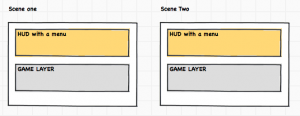
    What’s happening here is that I have two scenes and I want to share my HUD across both of them.

    The HUD also has a menu in it (for example a Settings button) that will launch a modal pop-up dialog.

    The way I’ve done it up to now is to use a BaseScene concept;


    @implementation BaseScene

    - (id)init
    {
    self = [super init];
    if (self) {
    NSLog(@"HUD Scene");
    [self addChild:[BaseLayer node] z:0 tag:1];
    }
    return self;
    }
    @end

    @implementation BaseLayer
    @synthesize currentNode, thisLayer;
    @synthesize hud;

    -(id) init
    {
    if ((self =[super init]))
    {
    self.hud = [HeaderHUDLayer node];

    if (self.currentNode == nil)
    {
    self.currentNode = [GamePlayLayer node];
    [self changeNodeTo:self.currentNode];
    }
    [self addChild:self.hud z:TopZLayer tag:kHUDTag];

    [[NSNotificationCenter defaultCenter] addObserver:self selector: @selector(changeHUDSceneObserver:) name: @"changeHUDScene" object: nil];
    } // end if
    return self;
    }

    - (void)dealloc {
    [[NSNotificationCenter defaultCenter] removeObserver:self];
    [super dealloc];
    }

    -(void) cleanup
    {
    [super cleanup];

    // deregister as observer
    [[NSNotificationCenter defaultCenter] removeObserver:self];
    }

    -(void) changeNodeTo:(CCNode *)thisNode
    {
    NSLog(@"changeNodeTo...");
    [self removeChild:self.currentNode cleanup:YES];
    [self addChild:thisNode z:0];
    self.currentNode = thisNode;
    }

    -(void) changeHUDSceneObserver:(NSNotification *)notification
    {
    NSLog(@"changeHUDSceneObserver = %@", notification.name);

    if ([notification.name isEqualToString:@"changeHUDScene"]==YES) {
    if ([notification object]!=nil) {
    [self changeNodeTo:[notification object]];
    }
    }
    }

    You can see here that I have:

    1. BaseScene
    2. A HUD included as a child of BaseScene
    3. All other subsequent layers are changed via NSNotification

    Whilst this “worked”, it caused a lot of unforeseen problems.

    Unforeseen problems

    1. I had NSNotifications everywhere and the whole project was becoming very unmanageable and messy
    2. I had a problem where Modal alert pop-ups were appearing underneath the HUD, and the modal alert did not disable touches on the HUD layer
    3. Modal alerts did not stop interactions on CCScrollLayers, or you could launch multiple modal alerts with lots of clicks

    The solution I’ve come up with is to use class forwarding instances and use brute-force to stop all the interactions.

    Class forwarding instances

    I don’t know if its actually called this, but it sounds about right.

    In the open-source game CastleHassle, the author sends “instances” back to the receiving layer and can pass the instance around; not only this he can call methods within the receiving class.

    In summary, it means doing this:


    @implementation MainMenuScene
    static MainMenuScene *instance = nil;

    +(MainMenuScene *) instance {
    if(instance == nil) {
    instance = [[MainMenuScene alloc] init];
    }

    return instance;
    }

    +(void) resetInstance {
    [instance release];
    instance = nil;
    }

    // This removes nodes I send to the instance and adds
    // new things.
    +(void) changeNodeTo:(CCNode *)node
    {
    MainMenuScene *main = [MainMenuScene instance];
    [main removeAllChildrenWithCleanup:YES];
    //[main removeChild:self cleanup:YES];
    [main addChild:node];
    }

    This returns an instance and then you can use it later on.

    In the HUD he has a controller, HUDActionController.


    // Hud.mm
    -(id) init {
    if( (self=[super init]) ) {

    [[HUDActionController instance] setHud:self];

    [self drawHeaderLayer];
    //[self drawFooterLayer];

    } // end if
    return self;
    }

    // Doesn't actually make it visible, just here for example
    -(void) toggleHUDLayerVisible:(BOOL)yn
    {
    NSLog(@"toggleVisible: %d", yn);
    [self scheduleUpdate];
    }

    -(void) update:(ccTime)delta
    {
    // To be safe
    [self unscheduleAllSelectors];
    }

    The HUDActionController acts like a MVC (not strict MVC) deciding what to launch.


    // HUDActionController.mm
    @implementation HUDActionController
    @synthesize hud;

    static HUDActionController* instance = nil;

    +(HUDActionController *) instance {
    if(instance == nil) {
    instance = [HUDActionController alloc];
    [instance init];
    }

    return instance;
    }

    -(id) init {
    if( (self=[super init]) ) {
    NSLog(@"HUDActionController");
    }
    return self;
    }

    -(void) goToMainMenu
    {
    // MainMenu needs to be included though
    [MainMenuScene resetInstance];
    [[CCDirector sharedDirector] replaceScene: [MainMenuScene instance]];
    }

    -(void) toggleHUDLayerVisible:(BOOL)yn {
    NSLog(@"toggleVisibility of Hud = %d", yn);
    [self.hud toggleHUDLayerVisible:yn];
    }

    So, I could do:


    [[HUDActionController instance] toggleHUDLayerVisible:YES];

    Yes, it probably isn’t proper design; like observers or factory methods but its more of a hack really then a proper scientific solution.

    So, using this concept, I can create a HUD on multiple layers and launch things on referencing classes using forwarders.

    Book solution

    In the book “Learn cocos2d Game Development with iOS 5” by Apress at around Chapter 5, the author describes a similar solution using “MultiLayerScene”.

    Quote,

    Simply put, the multiLayerSceneInstance is a static global variable that will hold the current MultiLayerScene object during its lifetime. The static keyword denotes that the multiLayerSceneInstance variable is accessible only within the implementation file it is defined in. At the same time, it is not an instance variable; it lives outside the scope of any class. That’s why it is defined outside any method, and it can be accessed in class methods like sharedLayer.

    The reason for this semi-singleton is that you’ll be using several layers, each with its own child nodes, but you still need to somehow access the main layer. It’s a very comfortable way to give access to the main layer to other layers and nodes of the current scene.

    I’ve not used the MultiLayerScene solution, but it seems just as viable as my solution.

    I will post code below at the bottom to give you an example.

    Now onto the next problem — ModalAlerts.

    Modal alerts

    One of the biggest stumbling blocks I had were modal dialog pop-ups or “modal alerts” as I will call them.

    I’ve been able to work with RombosBlog’s modal alert;

    http://rombosblog.wordpress.com/2012/02/28/modal-alerts-for-cocos2d/

    It uses blocks to handle callbacks, and is very easy to use.

    I can have a layer call up a modal alert, get a callback and handle the rest my own way.

    However, it came with its own issues I found very frustrating.

    Sometimes, rarely I might add, the modal alert did not stop interaction underneath the CoverLayer (a slightly dimmed CCLayerColor which holds the modal alert).

    This was very evident on CCScrollLayers. You could click on, move and interact with CCScrollLayers when the modal alert was being displayed.

    The other problem I had with the modal alert if you could click on a CCMenuItem (or a button) very fast you can spawn multiple occurrences of the ModalAlert.

    I found this very frustrating.

    At first I used this:


    // Disabled/Enable layers
    -(void) MenuStatus:(BOOL)_enable Node:(id)_node
    {
    for (id result in ((CCNode *)_node).children)
    {
    if ([result isKindOfClass:[CCMenu class]]) {
    for (id result1 in ((CCMenu *)result).children) {
    if ([result1 isKindOfClass:[CCMenuItem class]]) {
    ((CCMenuItem *)result1).isEnabled = _enable;
    }
    } // next
    }
    } // next
    }

    However, it did not stop interactions on CCScrollLayers; worse still I had to put it on every layer I wanted to handle this.

    The way around this was to use a BaseLayer (CCLayer) and make all my game layers inherit from this:


    @interface PlayerSetupLayer : BaseLayer // BaseLayer is a CCLayer

    Whilst this worked; it only worked it didn’t stop interactions with CCScrollLayers.

    To resolve this problem, I ended up using a mess of NSNotifications up the chain of command (CCNodes) to change or lock layers and to display models.

    Not only was this bad, its very hard to maintain. It was a mess!

    So what’s the solution?

    Well so far, I’ve got a “working” solution that is “almost” bulletproof. It is not perfect, though.

    The way I’ve done it is to combine the sharing of HUDs across multiple scenes and use the HUDActionController to decide what to do.

    For the modal alert, I used a rather hacky solution; just go through every node and disable/enable it so long as its not the CoverLayer class.

    ie,


    /**
    * This requires the following in your cocos2d project
    * CCScrollLayer extension
    * @url: https://github.com/cocos2d/cocos2d-iphone-extensions/
    * and
    * ModalAlert - Customizable popup dialogs/alerts for Cocos2D
    * @url: http://rombosblog.wordpress.com/2012/02/28/modal-alerts-for-cocos2d/
    */

    // Disabled/Enable layers
    -(void) MenuStatus:(BOOL)_enable Node:(id)_node
    {
    LOG_METHOD;
    if (_enable == YES) NSLog(@"MenuStatus.Enable = YES");
    if (_enable == NO) NSLog(@"MenuStatus.Enable = NO");

    for (id result in ((CCNode *)_node).children)
    {
    NSLog(@"Node result = %@", [result class]);

    if ([result isKindOfClass:[CoverLayer class]])
    {
    // Do nothing

    } else {

    // Scrolllayer
    if ([result isKindOfClass:[CCScrollLayer class]]) {
    NSLog(@"Found CCScrollLayer...");
    ((CCScrollLayer *)result).isTouchEnabled = _enable;
    for (id result1 in ((CCScrollLayer *)result).children) {
    NSLog(@" result1 class = %@", [result1 class]);
    if ([result1 isKindOfClass:[CCLayer class]]) {
    ((CCLayer *)result1).isTouchEnabled = _enable;
    }
    for (id result2 in ((CCLayer *)result1).children) {
    NSLog(@" child found: %@", [result2 class]);
    if ([result2 isKindOfClass:[CCMenu class]]) {
    ((CCMenu *)result2).isTouchEnabled = _enable;
    } // end if
    }
    } // next
    } // end if

    // Layers
    if ([result isKindOfClass:[CCLayer class]]) {
    NSLog(@"Found CCLayer -- %@", [CCLayer class]);

    // Disable CCLayer and any children?
    ((CCLayer *)result).isTouchEnabled = _enable;
    for (id result2 in ((CCLayer *)result).children) {
    NSLog(@"child found: %@", [result2 class]);
    if ([result2 isKindOfClass:[CCMenu class]]) {
    ((CCMenu *)result2).isTouchEnabled = _enable;
    } // end if
    } // next

    } // end if

    } // end if

    } // next
    }

    Summary

    In summary, I:

    • I have a base scene with multiple layer children under it (MainMenuScene -> Player Setup Layer, etc)
    • I use instances and class forwarding to change the child of MainMenuScene
    • I include a HUD, which is a CCLayer, onto the layers I need them on
    • The HUD uses an HUDActionController to decide where to go, and it also locks/unlocks things, including CCScrollLayers
    • The HUD will launch a modal pop-up dialog fine now
    • Other pop-up dialogs can appear higher than the HUD modal so long as the Z-Index is higher without any issue

    In numerical format, it sorta looks like this

    1. Main Menu Scene has a Main Menu Layer.
      1. Player Setup Layer replaces child of Main Menu Layer
      2. Difficulty Setup Layer replaces child of Main Menu Layer
      3. Game confirmation Setup Layer replaces child of Main Menu Layer
    2. Game Scene has a Game Layer
      1. Game Layer has a HUD child node in it
        1. HUD uses HUDActionController to handle routing and disable/enable touches
        2. If I launch a modal it will appear on top of HUD if z-index is higher, it will also disable touches under it
        3. If I launch a modal on the HUD it will disable everything except the modal itself and her children

    It isn’t perfect, but I’ve found it works for me. So far….

  • Sleeping Dogs review (PS3)

    Formerly known as True Crime: Hong Kong, Square Enix’s “Sleeping Dogs” places you deep in the underbelly of the Hong Kong triad crime family.

    Playing as Hong Kong officer, Wei Shen, you play a hard-boiled undercover cop whose goal is to bring down the triads, whilst along the way use weapons, martial arts, drive a variety of vehicles and use mechanics that one would associate with classic Hong Kong action cinema.

    During the story, Wai is deeply conflicted about where his loyalties lie — is he a cop, or is he a Triad member?

    The game has a lot of Hong Kong stylized action, you can perform bone-crunching kung fu style action, drive cars, bikes and perform action-inspired sequences filled with high octane thrills and chases, including “pakour” style free-running.

    It also has the standard GTA-clone like objectives called “side-missions”, hidden collectables, and a limited amount of customisation of clothes, and vehicles.

    “Sleeping Dogs” is a lot of fun, high-octane action, and has lots of things that keep you interested and engaged, it has amazingly fun fighting, driving, and shooting mechanics, an interesting story and lots of side-mission content throughout.

    However, there are things I didn’t like.

    The first is that the game is way too short, I counted around 15-20, maybe 25 hours of story mode and never once do you make decisions about your character’s storyline.

    For example, the story builds the conflicted loyalty narrative to an apex where you feel it will come to a point where you, the player, will have to decide whether to choose your loyalty between the cops and triads; sadly this never happens and it felt like a wasted opportunity.

    Key features from the “True Crime” franchise are missing

    A further point to add about the lack of features that fans of the original “True Crime” franchise enjoyed, for example there is no ability to arrest people, or undertake random world events.

    A further issue I felt was underwhelming was the feature of “property damage”, where I felt you could cause a bucket load of damage but nothing of consequence actually happens; you never get demoted, you never get reprimanded by the Police captain and you never fail a mission because of “property damage”.

    Choosing to play as a “good” or “bad” cop was sold as a feature of “Sleeping Dogs”, but in the end it feels laxidasical and slapped on.

    On the plus side, I found the idea of finding Collectables were interesting and rewarding in that they give you advantages such as better fighting, better health, and other RPG-like attributes.

    The fighting is also very fluid, and it feels like a lot of fun; my only concern with it is that there only 3-types of enemies and once you’ve figured out the pattern, it becomes incredibly easy to beat the enemies.

    In addition to this, you can obtain Jade figurines and new fighting styles; whilst this is fun, it actually makes the enemies feel very cheap as they do not scale with you, and you end up being so overpowered that the enemies seem like pushovers and offer no threat.

    That aside, my biggest issue with “Sleeping Dogs” is the concept that “Sleeping Dogs” is a “love-letter” to Hong Kong action cinema.

    Frankly, it isn’t.

    Love letter to Hong Kong action cinema?

    As a major fan of the “Hong Kong action cinema” of the 80s and 90s, I felt “Sleeping Dogs” did not captalize on homaging scenes in movies in the game.

    There is no recreation of classic scenes in the games, there is no fight in the mall from Jackie Chan’s 1985 hit, “Police Story”. The shoot-outs might “look” and “feel” John Woo-ish, but you never get two guns. There is no Bruce Lee like level or a fight sequence homaged from a Donnie Yen movie.

    Whilst things like the underground fights is on homage to “Bloodsport”, there is no “Enter the Dragon” fight on an island. Sure you get to wear a Banana Suit, but that’s about it.

    Jet Li’s Playstation 2 game, “Rise of Honor” had better fights and understood “Hong Kong” action cinema and even homaged the Hospital shoot-out in John Woo’s “Hard Boiled” in one level.

    The fighting style is very street-style and the use of street furniture for brutal finishing moves is very enjoyable and a good homage to the old Jackie Chan, Donnie Yen, Jet Li and yes, even the more brutal Tony Jaa movies of yesteryear.

    In terms of fights, yes they are fluid — but the lack of actual fighting styles was very disappointing. There was no Drunken Boxing, no wing chun, all the fights were street-based and MMA-inspired; you won’t be fighting like Sammo Hung or Donnie Yen in this game.

    One final point I wish to add that cements my view that “Sleeping Dogs” is not a love letter to Hong Kong action cinema, and that is — the down-right bizarre choice to have Georges St-Pierre (GSP) not only promote the game, but for some reason include his “moveset” into the game as perhaps the worst in-app purchase for a AAA-game I’ve ever seen.

    I’m sorry, but what does Georges St-Pierre have to do with classic Hong Kong action cinema? Why was he even promoting this game? Could Square Enix not afford the likes of Donnie Yen, Sammo Hung or Yuen Woo-ping, the action co-ordinator of the Matrix and a bucket-load of Hong Kong action movies?

    To me, I felt the fighting and lack of actual homages to classic action cinema was the biggest let-down of “Sleeping Dogs”; and instead the game was simply set in Hong Kong rather than a “love letter” to Hong Kong action cinema.

    Final analysis

    “Sleeping Dogs” is a lot of fun, fast-paced action with good missions and an interesting story but it lacks the real heavyweight endorsement of a Hong Kong action cinema superstar and the lack of features let the game down overall.

    I’d say “Sleeping Dogs” is an excellent rental for those who want fast-paced action and lots of stuff to do.

    Overall: 6/10

  • Website changes

    I am in the process of changing my website. There is a bit of confusion as the website has a logo and has a confusion about what it actually is meant to be; is it a personal website, blog — or, alternatively is it a brand name, a company, or a holding name for something else?

    For the past four or five years the website has been both a personal website, and a “brand” or “company” and both expressing ideas and concepts I thought were interesting; and selling professional services.

    I’ve always been torn about whether the website could do both at the same time, it is my expectation to turn it into a personal site; however I have thought seriously about selling up and moving on to something else — but this is not something I can decide without a lot of fore-thought.

    It is my intention to focus back on exploring ideas for the time being.

  • Mobile marketing is a booming industry

    Your customers are no longer using traditional desktop computers and modern browsers to view your website, they’re using their iPhones and Android smart-phones, TV, Net-books and more devices are on the way. You need to be connecting with your customers on mobile, desktop, anywhere; everywhere…

    Like any business owner, advertising is an expense to your bottom line. So, it’s important to spend your advertising dollars to your greatest advantage. And as technology changes, advertising strategies and tools must change, too.

    Even if you have a website, you may not be convinced that mobile advertising is right for your business. Following are some statistics that might change your mind.

    * Nielsen Mobile, which reports on trends in the wireless industry says that 50.2 percent of mobile subscribers in the US are smart phone users and make regular use of the mobile Internet on their devices.

    * Nielsen also reports that these mobile customers most often use their mobile internet connection to visit websites – even more frequently than they use it to access email.

    * Yahoo reports that it expects that by 2017 more users will access the internet via their mobile phones than via their home or business PC’s.

    * eMarketer reports that even older baby boomers (those aged 54-62) are accessing the internet frequently, meaning that internet marketing truly appeals to all ages.

    * eMarketer also reports that in the UK, restaurant advertising on mobile phones grew, and clothing ads each are growing at a rate of over 37.2% on mobile phones.

    * This same report in eMarketer reports that the restaurant ads sent to mobile phones reported a 15.5% response rate. These ads utilized SMS messaging technology, rather than web browsing.

    Mobile marketing is huge, and that businesses need to get out of the mindset that a website is enough — and that mobile can be ignored; when in reality, mobile is increasingly the way people search, browse and shop online.

    The reality is that mobile engagement gives immediate calls to action; that is, to call you – the business owner.

    The bottom line is, in today’s world, you simply cannot afford to ignore mobile any longer.

    Sources:


    Google “The Mobile Movement: Understanding Smartphone Users,” 2011

    Lightspeed Research, 2010; Google “The Mobile Movement: Understanding Smartphone Users,” 2011

    “Mobile Web Has More Users While Mobile Apps See Higher Engagement | Mobile Marketing Watch”

    Gartner, “Gartner’s Top Predictions for IT Organizations and Users, 2010
    and Beyond: A New Balance,” 2010

    Forrester Research via Google, “What Users Want from Mobile,” July 2011

    Baby Boomers: Neglected by Marketers, eMarketer

    Report: The Rise of Smartphones, Apps and the Mobile Web, Nielson.com

    “The Third Screen: Marketing to Your Customers in a World Gone Mobile: How to Keep Up – and Soar Ahead – in the World of M-Commerce”, Chuck Martin

  • Smartphones increasingly used for surfing the web

    People spend more time using their smartphones for surfing the web, checking social networks or playing games than making phone calls, new research has found.

    According to the Telegraph, the report has indicated that on average day, 25 mins is spent on Internet browsing, 20 minutes is spent on social media, whereas people will spend an average of 12 minutes on actual telephone calls.

    Original article (Telegraph)

  • Two new apps published

    I’ve recently helped two clients create their own iPhone apps;


    Gary Christie’s Racing Tips

    and

    Brewlab app
    Brewlab for iOS

  • My quick review of Saints Row The Third

    The third installment of the Saints Row game, “Saints Row The Third” sees you trying to take over the city of Steelport.

    Whereas I did enjoy Saints Row 2 and found it a good throwback to what made GTA3, GTA Vice City and San Andreas fun; I found Saints Row 3 to be quite boring.

    Despite all the positive reviews of Saints Row 3, I feel that this “GTA sandbox clone” is actually quite poor.

    There is very, very little content. The mission/story mode of the game can easily be completed within a few hours, and the difficulty of the game is pretty easy — even on hard.

    The story seems interesting, and the role-play element where you can choose your path seems an interesting path, but these are window dressing to the actual gameplay.

    The upgrading system also makes a total mockery of the difficulty. Within a couple of hours you can upgrade your character to the point where he/she is impervious and have unlimited ammo.

    The one thing that really annoyed me the most about Saints Row 3 is that it brings nothing new to the genre. GTA SA, a game that came out more than 5 years ago has more content than this game. Hell, even GTA:Vice City Stories had more interesting features than Saints Row 3.

    There STILL is no working economy system, the assets/property system is extremely poor; especially as you cannot enter a vast majority of the buildings you purchase. Worse still, the rival gangs, that you are feuding with, do absolutely nothing — they never attack your compounds, buildings, or assets.

    In short, I feel the game offers no re-playability, no difficulty and no long-term enjoyment.

    I would rate Saints Row The Third as a rental only and give it 4/10